Latest Article Get our latest posts by subscribing this site

How to Create PDF files from Microsoft Word

Creating PDF files by using the Adobe PDF printer.

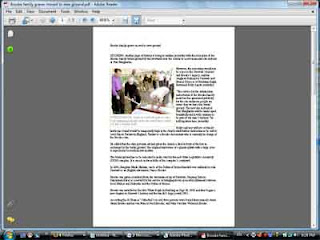
After you specify your printing options, you can create a PDF file from the Word document.

To create a PDF file using the Adobe PDF printer:

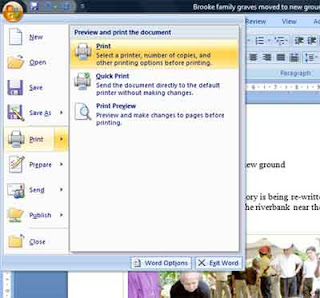
1. In Word, choose File > Print.
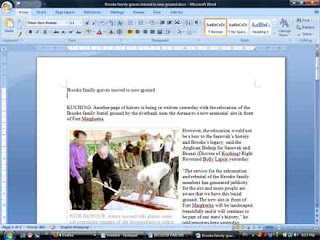

2. Choose Adobe PDF from the Printer Name pop-up menu. In this example I am using primopdf
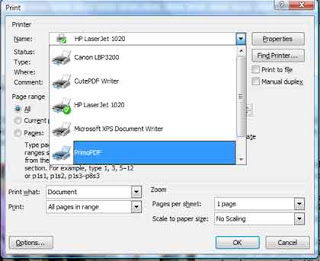
3. Click OK, and specify a filename and location for the PDF file, and then click Save.
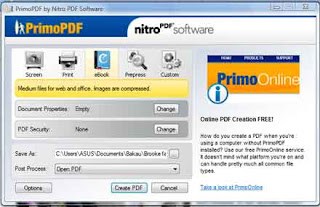
4. Done.

How create a PDF file?

First you will need the full Acrobat software (not simply the Acrobat Reader).
(Acrobat is available at a substantially reduced price for educational establishments.)

Acrobat provides three methods for creating PDF files:

  • PDF Writer, the quickest and easiest method for creating PDF files
  • Acrobat Distiller which uses a more intensive process to optimise compression and functionality
  • Acrobat Capture to convert scanned paper documents into PDF pages

The exact method of creating a PDF file depends on the version of Acrobat which you have installed. You may have one or more of the following options:

  • An icon on your wordprocessor toolbar pdf icon. If you click on this a PDF file of your Word document will automatically be created. You will be prompted for filename.
  • A 'Print to PDF' option on the File Menu. This will automatically create a PDF as above.
  • PDF Writer and/or PDF Distiller listed in the Print dialogue box.
If you want to buy acrobat software you can get it here.


Why use PDF?

If you want to transfer files by email or the Web to other computer users and to ensure that your files are readable, the safest option is to convert them to PDF. Other computer users will not always have the appropriate software to view your text and graphics files but the software to read PDF files is free and widely installed. PDF is frequently used as a 'print-friendly' format which can be made widely available from the Web.

PDF files will appear exactly the same whatever computer you use, so a PDF file made from a document which was originally formatted in Word will look exactly the same on someone else's machine as it did on yours. This is true even if graphics were embedded in the original file.

PDF is:

* Widely used
* A compressed format
* Viewable on any computer - formatted as it left the author
* Able to include any text, tables or graphics as a single file
* Printable

Two type of PDF writer or Pdf Convertor I like to use.

1. PrimoPDF is the best Pdf convertor that I ever used. It's becouse partnership between Nitro PDF Software and activePDF, Inc. PrimoPDF is a free tool for high-quality PDF creation, comprising a user-friendly interface that enables printing to PDF from virtually any Windows® application. Since its launch in February 2004 and with millions of users to date, PrimoPDF has rapidly become the world's most widely-used tool for free, basic conversion to PDF with millions of users to date and is consistently ranked as the #1 most popular Business & Productivity software download on CNET's


2. Portable Document Format (PDF) is the de facto standard for the secure and reliable distribution and exchange of electronic documents and forms around the world. CutePDF Writer (formerly CutePDF Printer) is the free version of commercial PDF creation software. CutePDF Writer installs itself as a "printer subsystem". This enables virtually any Windows applications (must be able to print) to create professional quality PDF documents - with just a push of a button!


Add adsense to youtube soon outsite US

Last October 2008 Google announced at the AdSense blog that now all US publishers who are in the AdSense program can add video units to their sites. A video AdSense unit looks like this:

the AdSense page about Vidieo Unit. It states: "Currently this feature is open only to publishers located in the United States with English-language websites." The full page is here: Inside AdSense: Introducing video units

Let's wait to see when Google open the door for us non-Americans.

For American


Non-American

Video Sample


How to download themes to handphone

1. Choose themes

2. Select your phone model

3. Search type of themes your want to download.


4. Choose and select your themes . Let say I choose animated tacho.

5. Select the Download button
6. Make a verification. Type the verification numbers inside the box.

7. Download to your PC.
8. Switch on your phone bluetooth . Select the .sis file send it to Bluetooth devise.

9. Browse and select your phone

10. Select your phone.
11. You will receive the themes. select ok.
12. Themes will be upload to your phone.
13. Change your themes. Setting. >menu> themes,

14. done.

How to download cellphone themes?

happysus suggest one web site to download cellphone themes for free. OwnSkin is an online theme creator (or editor). You can make your own theme in just 3 simple steps!

Theme Storage.You can save, share, download all your themes in OwnSkin storage! And we do not limit the number of themes you can save here now!

Free Service. OwnSkin is a FREE service! You can support us by telling your friends about our site!


click here

Setup Quran dalam word

Setup Quran dalam Words. Saya akan tunjukkan contoh setup Al Quran dalam Words. Anda kena install dulu fail.

1. Download fail setupQuran in Words (New fail)

download

2. Unzip fail

3. Contoh selepas install. Automatik boleh guna dalam words


4.


6

How to download video from YouTube

Ramai kawan-kawan yang bertanya saya bagaimana saya download video Youtube. Sebenarnya banyak cara yang telah saya cuba. Ada download secara online. Contohnya http://keepvid.com/.
Ia mudah tapi susah bagi anda yang capaian internet slow.

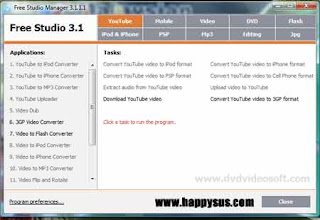
Okey. Saya perkenalkan anda dengan free studio manager. Setakat ini, software ini adalah yang terbaik. Free download software ini adalah percuma. Selamat. Jangan khuatir.

cara:
1. Download soft ware dari download.com.
2. Install dalam komputer anda.
3. Anda akan dapat seperti gambar di bawah seperti dibawah


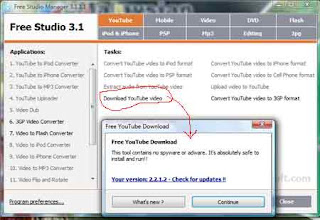
4. tekan "download Youtube video"

5. Buka Youtube copy copy url video yang ingin di download.


6. Masukkan url di atas dalam input url seperti dibawah:

selamat berjaya

happysus.com

Video - Cikgu garang


- Free videos are just a click away

Ini bukan budaya cikgu Malaysia

Hantar SMS Percuma kepada 1000 orang

Hantar SMS Percuma kepada 1000 orang.(or sent SMS to 1000 people free). Ramai yang merasa kenyataan ini tidak manusabah. Kawan saya terlibat dengan MLM. Mereka telah lama mengunakan keadah ini.

Saya ingin kongsikan bersama anda, pembaca blog saya. Sekiranya anda ada ramai kawan atau persatuan. Kini anda sebagai setiausaha boleh hubungi mereka dengan percuma.

Caranya adalah menggunakan google calander.

Satu masalah adalah setiap ahli yag ingin menerima SMS anda kenalah buat notification dalam dan create akaun gmail.

Saya sediakan video dibawah. Sekira ada pertanyaan boleh post pada ruangan komen.

Hot Download

 
Support : Official Site | Islamik Info | directory
Copyright © 2013. Tonton TV3 - All Rights Reserved
Template Created by Creating Website Published by Bersama happysus
Proudly powered by Blogger