Latest Article Get our latest posts by subscribing this site

How to recover your deleted files


Have you ever experienced that your files are deleted incidentally? What do you usually do to recover your files? I think if you do not know the way to recover your deleted files, you will rewrite your works then save them in your folder. However, if your manual data is too a lot, can you still do that? If you can do that, how long will you finish your work? Well, readers, now the computer technology has grown up more and more. You do not need to do as the questions above. Now you can recover deleted files just with a peace of software. I have found the best software to fulfill the needs; the software is called Easy File Undelete. I found it at Munsoft.com. That is the best software to help you recover your deleted files.

Easy File Undelete has the size of 1.7 MB, and you can easily download it for free trial from Munsoft.com. The features included are interesting. I cannot mention one by one here, you can find them yourself at Munsoft.com. I think you should download the software to prove and see that the software works properly to recover your deleted files.

How to get paid with ziddu


What is Ziddu? How to make money with Ziddu?

Ziddu is a completely free file hosting which offer many great services and allow their members to earn and make money from their uploads. They gives user flexibility to create audio and video to share with other peoples. Unlike other free hosting Ziddu accepts parallel download so you don't have to wait for the countdown time to end anymore.

How to get paid?

Ziddu pay you by PayPal or Money Bookers. You will have to wait for 40 days before your receives your payment. you'll be able to withdraw you revenue after your earning reaches $10.

How to make money with ziddu - step by step registration guide

1) Go to Ziddu website Here.

2) You will see the form below. Fill in your name, email, password, verify code, tick on I agree terms and conditions then click the submit button.


3) After registeration you can login to your account at login page.


4) After you login go to payment settings as shown below.

ziddu payment settings

5) At payment details choose PayPal or Money Bookers.

ziddu payment details

6) To upload files go to MyFiles.

ziddu my files

7) You can either upload a single file or multiple files.

ziddu upload

8) After you have completely uploaded your files to their server you will get link which look like the one below.

ziddu upload complete

9) Now all you have to do is promote this link to where peoples are heavily spotted and watch money pouring in to you account !.

Here is payment proof earning from ziddu which is usually payout after 40 days of the previous earning.

ziddu payment proof

Upload files and get paid now !

Skype 4.0 for Windows


Skype 4.0 for Windows


click here

The all-new Skype for Windows.

Built for conversations that make a difference

Happy with the Skype you've got? You ain't seen nothing yet, baby. This brand new version will change the way you stay in touch.

Best ever sound.

It's a big step up. It's super clear, with smart help that pops up the second we detect a problem.


Bigger video.

Now video calls open in a great big screen that goes full-screen in one click. Incredible picture turns calls from closer to special.


So easy.

New one-click buttons and clean, simple layout make it wonderfully easy to use.


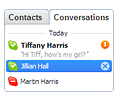
Keep conversations going.

With the new Conversations list, jump in and out of conversations
 you're having. Pick up where you left off in one click.

Hot Download

 
Support : Official Site | Islamik Info | directory
Copyright © 2013. Tonton TV3 - All Rights Reserved
Template Created by Creating Website Published by Bersama happysus
Proudly powered by Blogger